

Graduation 2026
How to add UCT graduation stickers to your Facebook story
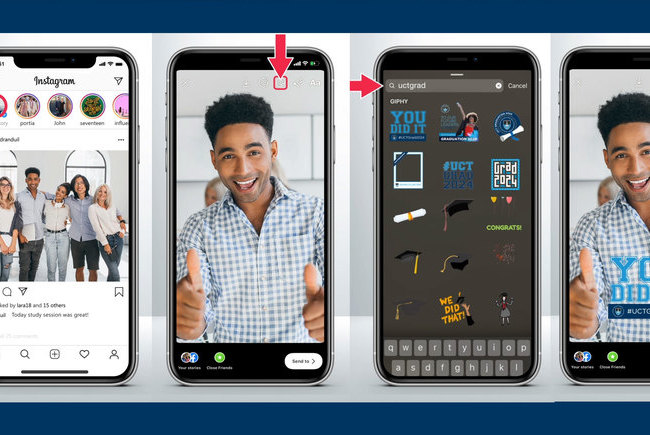
24 March 2026You can easily add UCT graduation stickers to your Facebook story by following these easy instructions.
Step 1: Click on “Create a story” icon
Step 2: Select a photo to add to your story
Step 3: Click on the “Sticker” icon
Step 4: Select the “GIF” option on the top section of the screen, which will take you to the Giphy page
Step 5: Type “uctgrad” in the search field
Step 6: Choose your GIF
Step 7: Position and resize your GIF
Step 8: On the bottom right side of the screen, click on the “Share to story” button
Done! Your story is now live
To view your story click on “Your story”
 This work is licensed under a Creative Commons Attribution-NoDerivatives 4.0 International License.
Please view the republishing articles page for more information.
Videos




UCT hosted the Vice-Chancellor’s Heads of Missions Breakfast as part of efforts to strengthen relationships with diplomatic missions and position the institution as a strategic partner in international collaboration.
17 Feb 2026


Professor Aubrey Mainza invites prospective students to the Faculty of Engineering & the Built Environment (EBE), where a student-centred approach to cutting-edge research and experiential learning prepares ethical leaders to solve complex challenges and design a more sustainable world.
15 Jan 2026